AI-native planning and controls for capital projects
Build a real schedule in minutes. Keep it honest all job long.
A real critical-path engine with Claude working beside it, for owners, designers, consultants, and builders. Claude drafts every change. You review it and apply it. Nothing moves on its own.
Real CPM, not a glorified spreadsheet · Unlimited free external collaborators
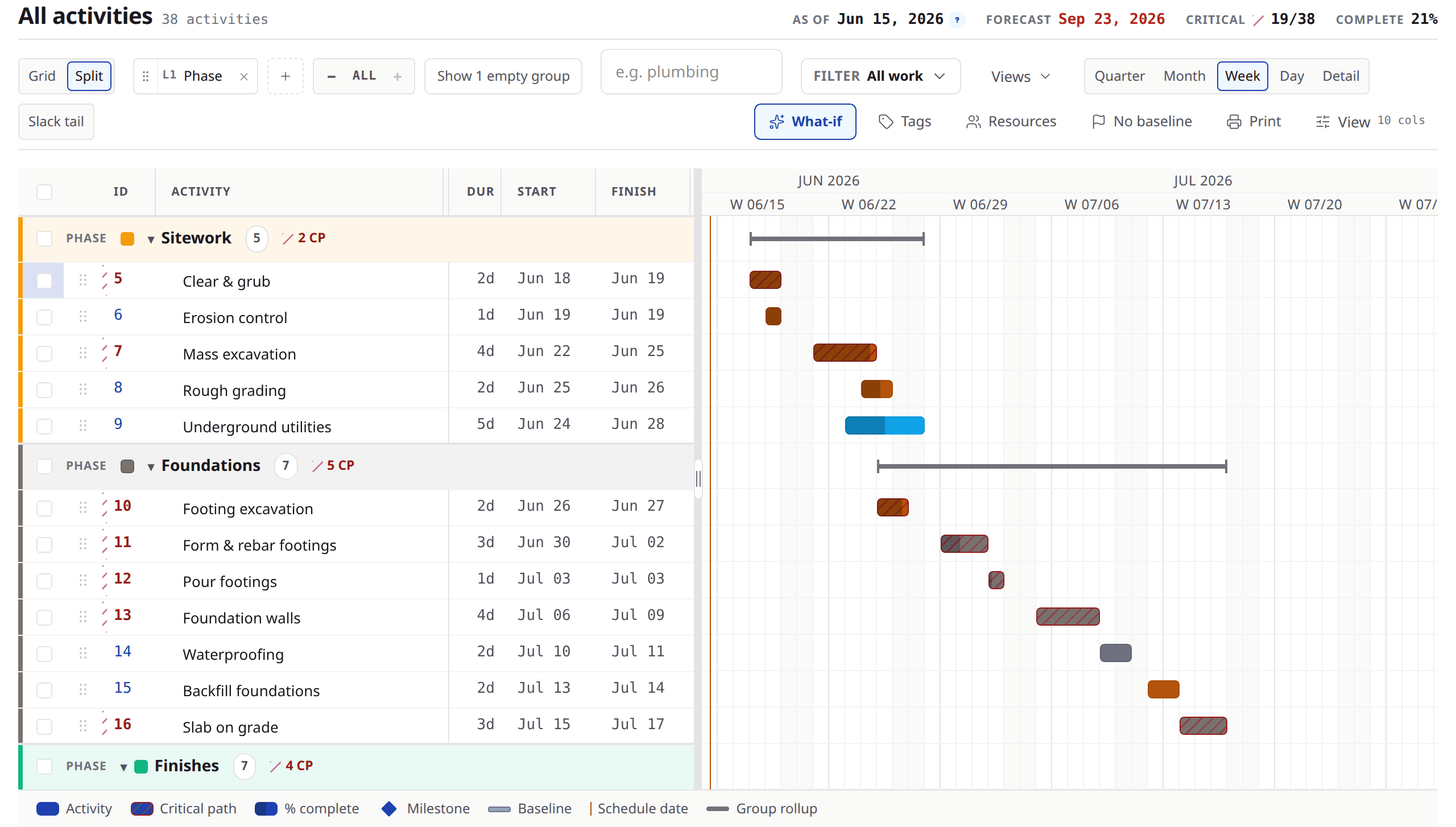
- Stays responsive while typing at 1,000+ activities.
- Forward and backward pass CPM, with total float, free float and driving links.
- Every AI change is reviewed by a person before it lands.
- External collaborators join free.
From your documents to a schedule
Upload what you have. Review what comes back.
01
Upload what you have
A budget, a space plan, the basic facts about the job — the documents that already exist. There is no template to fill in first.
02
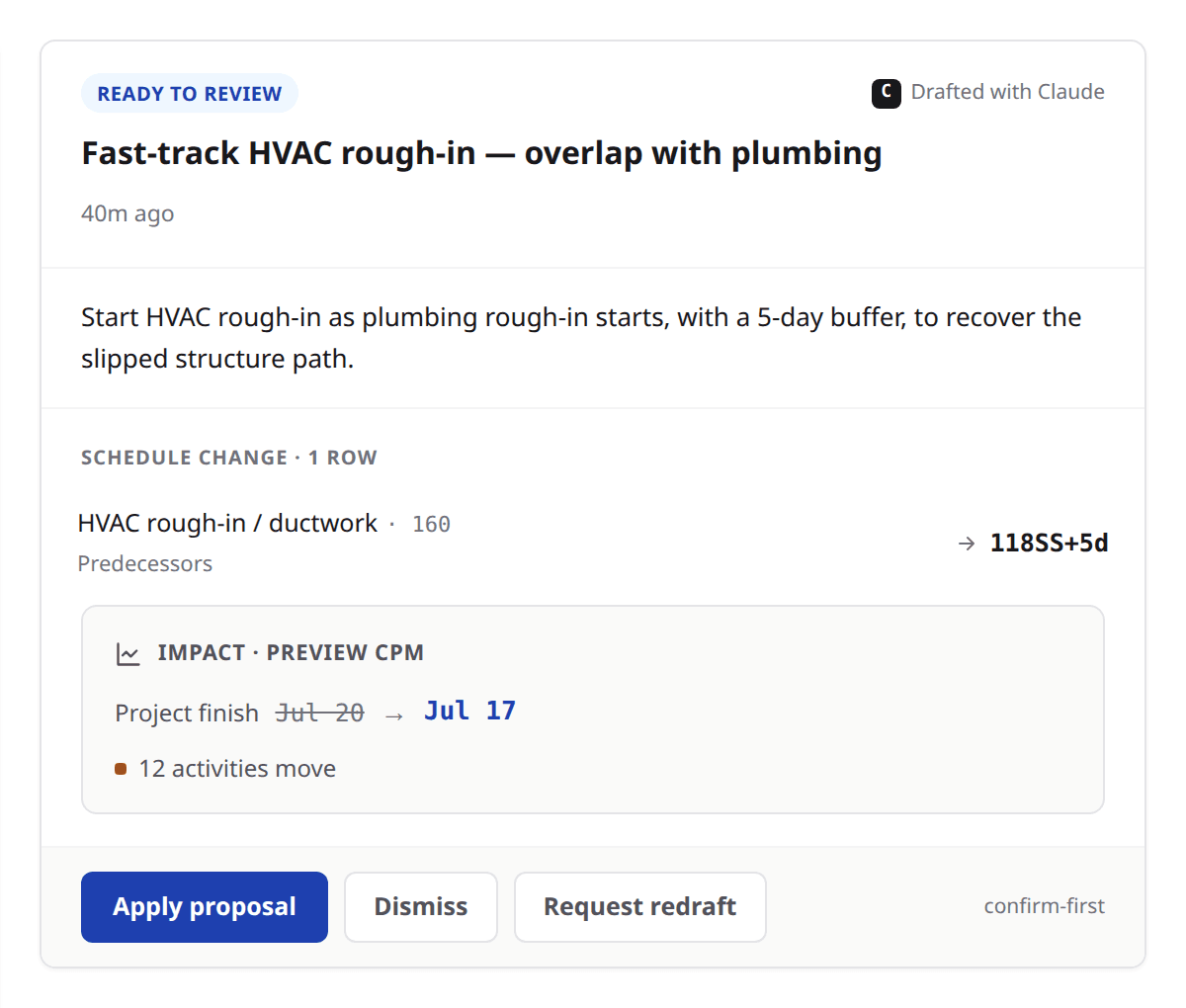
Claude drafts the fully linked schedule
In minutes: phases, activities, durations, logic and milestones, with the assumptions it made written down beside them. It arrives as a proposal, not as a schedule that wrote itself.
03
You review the draft on the real grid, then apply
See every date it would move, on your own grid, before any of them move. Then apply it or send it back for a redraft — and whatever you apply is logged and attributed to you.
One model, the whole job
Construction scheduling software the whole job works from.
The grid, the field, the record of what went wrong, and the reports that come out of all three — addressed by the same model that Claude and the connector address.
Schedule grid and Gantt
You type at spreadsheet speed and get a real critical-path model underneath. Your team works the same schedule at the same time, and nobody silently overwrites anyone.
Slice it by anything: unlimited custom dimensions and tags — area, phase, trade, procurement — with stacked grouping, filters that compose, and saved views you can share.
Daily check-in
Your superintendent answers what was supposed to start as of the schedule date — and did it — plus the same question for work already going. Under a minute, no schedule training.
Progress is days left, not a percent somebody guessed at — the field reports the number it actually knows, and the rest is derived.
Blockers and delays
When your team flags lateness, it becomes a dated record instead of a date that quietly moved — so what you can say months later is what somebody wrote down at the time.
Delay records, candidate detection that suggests rather than files, and notice drafts for the project team to review.
Reports owners trust
Your owner gets status, milestones, look-ahead and summary straight off the schedule, so nobody retypes it into a deck the night before. Every PDF you generate is frozen as a record.
Send a link, take it back when you want, or let it expire on its own.
Claude, built in
Ask about the schedule in front of you and Claude answers from it, showing the tools it uses as it works. It drafts changes as proposals — it cannot apply one itself.
Draft, see what it moves on your real grid, then apply it or send it back.
What-if scenarios
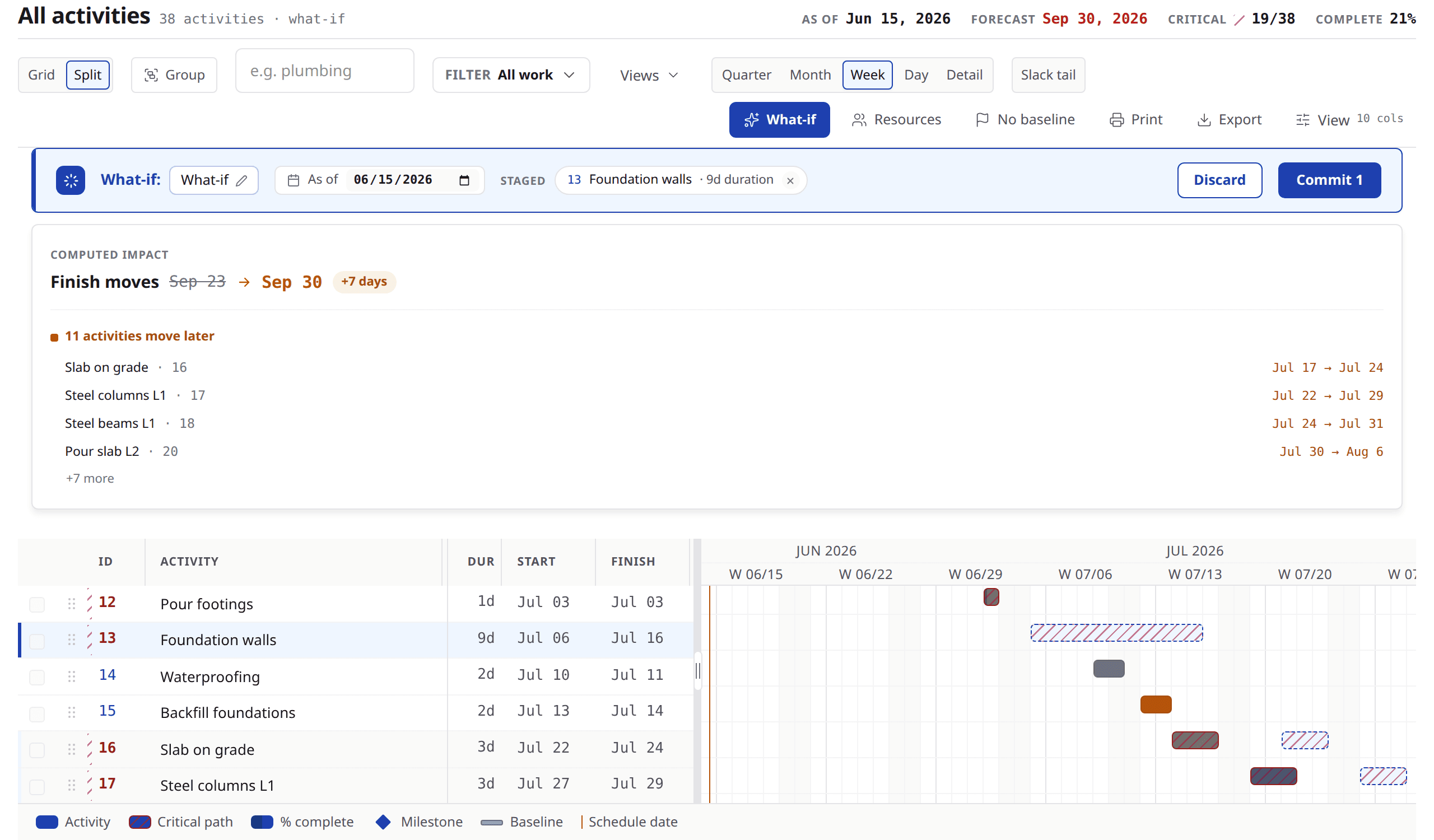
Ask what happens if the steel slips two weeks and get the answer on your real schedule instead of a copy of it. Every date that would move shows up before you decide anything.
Keep it or drop it — nothing is committed until you say so.
Security and control
Your collaborators work from the real schedule, never from your costs. Every change is logged to a person, and what someone may not see never leaves the server.
A share link you revoke stops working, and a link that misses tells whoever holds it nothing at all.
What-if
Change one thing. See everything it moves.
What happens if the steel slips two weeks? It is the question every schedule conversation turns on, and answering it usually means copying the file, editing the copy, and hoping everyone remembers which one is real.
In Brikt you stage the change on the schedule itself. It runs against the same engine the schedule runs on — not a simplified preview — so what comes back is every date that moves and what it does to the finish. Keep it, or drop it. Nothing is committed until you say so.
The trust model
Real AI. Zero surprises.
The worry about AI on a schedule is simple: what if it moves something nobody approved? Claude reads the project information your account can see and drafts changes as proposals — it cannot commit one to the schedule. Only a person can, from one reviewable surface, with a full audit trail.
Claude drafts
From a question, a slip it noticed, or a file you handed it, Claude proposes a change. It never applies one.
You review
See the change on the real grid, the activities it touches, and what it does to the forecast finish.
You apply
It commits through the same path a manual edit uses — logged, attributed, and reversible.
Brikt helps project teams plan, manage, document, and communicate construction schedules. Final review and responsibility for every schedule, narrative, notice, and report remain with the project team.
Everyone on the job
Invite the whole job. Pay for your own team.
Pay only for your company’s team. Every subcontractor, owner, and architect you invite is unlimited and free.
Invited collaborators work from the real schedule — dates, float, the critical path — while your costs, internal notes, and baseline comparisons stay yours.
One schedule, every seat
Each role gets the view that suits the work.
Scheduler
The full grid: CPM logic, float, constraints, calendars and a predecessor language, with grouping and saved views instead of a rigid outline.
Project manager
Schedule health, blockers, delay records and the reports an owner reads — all off the same model, with no re-keying between them.
Superintendent
The daily check-in: what was due to start, and did it. One answer per row, and a catch-up band for the mornings nobody got to.
Subcontractor
The real schedule, free. Costs, internal notes and baseline comparisons stay with the company that invited them.
Owner
Status, milestones and the look-ahead, as a report or as a share link you can revoke.
Pricing
Per-seat pricing. Everyone you invite is free.
Every plan carries the whole product. What you choose between is how many seats and how many active projects the subscription covers.
Annual billing carries the lower per-seat rate. Seats are your own company’s team.
Starter
For a small team running a few jobs at a time.
$59/seat/mo
Billed annually
- Minimum 1 seat
- Up to 5 paid team seats
- 3 active projects
- Unlimited free collaborators
- Most popular
Professional
For teams running several projects across the office and the field.
$129/seat/mo
Billed annually
- Minimum 3 seats
- Up to 25 paid team seats
- 25 active projects
- Unlimited free collaborators
Business
For organizations where scheduling is a core workflow.
$249/seat/mo
Billed annually
- Minimum 5 seats
- No cap on paid team seats
- Unlimited active projects
- Unlimited free collaborators
Enterprise
For large organizations buying through procurement — contract terms, volume pricing.
Custom · typically $400+/seat/mo
Billed by contract
- Minimum 10 seats
- No cap on paid team seats
- Unlimited active projects
- Unlimited free collaborators
Volume discounts apply automatically
Discounts come off the list rate by seat count. Nobody has to ask for them.
| Seats | Discount |
|---|---|
| 1–9 | List price |
| 10–24 | 5% off |
| 25–49 | 10% off |
| 50–99 | 15% off |
| 100–249 | 20% off |
| 250+ | Talk to us |
What each plan includes
Every plan gets the whole product. What changes between them is how many paid team seats and how many active projects the subscription covers.
| Plan | Starter | Professional | Business | Enterprise |
|---|---|---|---|---|
| Plan limits | ||||
| Minimum seats | 1 | 3 | 5 | 10 |
| Paid team seats | Up to 5 | Up to 25 | No cap | No cap |
| Active projects | 3 | 25 | Unlimited | Unlimited |
| In every plan | ||||
| Invited subcontractors, owners and architects | Unlimited, free | Unlimited, free | Unlimited, free | Unlimited, free |
| Critical-path engine — grid, Gantt, float, driving links | Included | Included | Included | Included |
| Saved views, grouping, filters, undo and Excel copy-paste | Included | Included | Included | Included |
| Daily check-in, blockers and look-ahead | Included | Included | Included | Included |
| Reports, archive and revocable share links | Included | Included | Included | Included |
| Delay records, candidates and notice drafts | Included | Included | Included | Included |
| Ask Claude, proposals and guided MSPDI import | Included | Included | Included | Included |
| The claude.ai connector, draft-only | Included | Included | Included | Included |
| Baselines, variance and schedule health | Included | Included | Included | Included |
| Real-time collaboration and presence | Included | Included | Included | Included |
| Audit trail and per-field conflict protection | Included | Included | Included | Included |
| Claude usage | Bundled — no credits, no metering | Bundled — no credits, no metering | Bundled — no credits, no metering | Bundled — no credits, no metering |
Questions
The ones people ask before they book anything.
Can Claude change my schedule without me knowing?
No — and not because of a setting somebody could turn off. Claude drafts; a person applies. Every AI-authored change arrives as a proposal you review on the real grid, and applying it is a deliberate act that is logged and attributed to you.
The claude.ai connector works the same way. It exposes reading and drafting, and there is no apply on the other side of it at all: absent rather than disabled.
Is my project data used to train AI models?
Anthropic's commercial terms do not permit content submitted through their API to be used to train their models, and we do not use your project content to train models of our own.
Can I import my existing schedule?
You can bring a Microsoft Project XML file. Claude reads it and drafts it back to you as a proposal — the same review surface as any other change — so nothing writes straight into your project and there is no bulk load that leaves you guessing at what it did.
A file Brikt cannot read is refused with a clear message rather than half-imported. That is the whole of what exists today, and we would rather say so than promise a format we cannot read yet.
What do external collaborators pay?
Nothing. That is the pricing model rather than an introductory offer.
Pay only for your company's team. Every subcontractor, owner, and architect you invite is unlimited and free.
Which company holds the subscription and which people are external collaborators is decided per project, not by company type — an owner can hold the subscription with the general contractor invited as an external. The free claim attaches to the relationship, never to a kind of company.
How do I get started?
Book a demo and bring a job you are running now. A real schedule with a real problem on it is worth more than a walkthrough of a sample project, and it is the fastest way to find out whether this fits how you work.
Self-serve plans open soon. There is no permanent free tier: Brikt is paid for by the company that runs the schedule, and the people that company invites are free.
See Brikt on your next job.
A walkthrough on a real schedule. Bring a job you are running now.